Visitor Management
Pre-registered invites, walk-ins, kiosk self-register, host approval, QR check-in. Pass auto-disables on expiry.
AccessOS runs your visitor lifecycle, lobby kiosk, and audit trail on one browser-first stack. Built for corporate HQs, multi-tenant office towers, and multi-building operators. Integrates with your ACMS at Enterprise for full building access.
Sign up on the live tenant. No payment required. Free tier stays free.
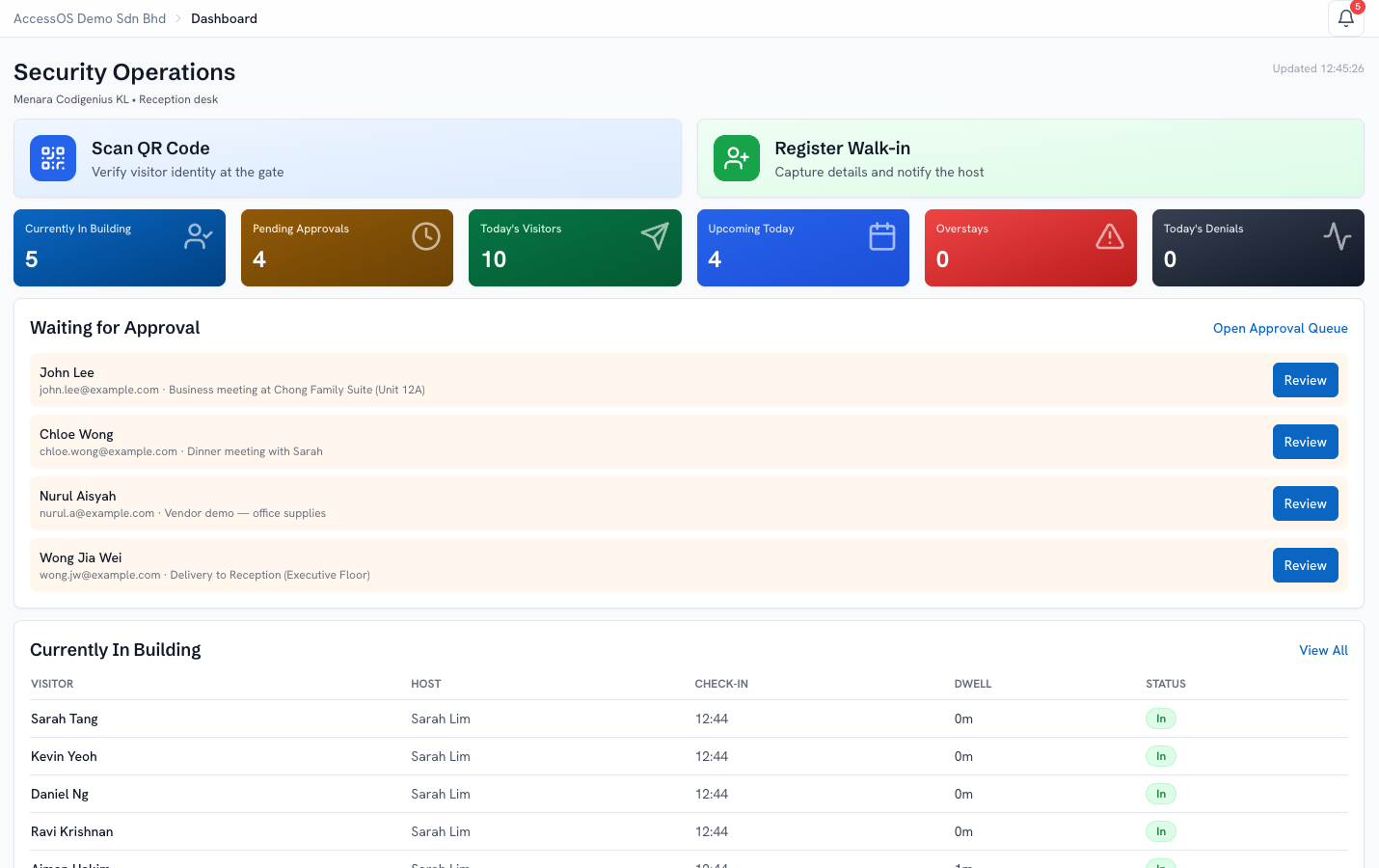
Every feature ships with the platform. Standard enforces access at the lobby kiosk on visitor arrival. Enterprise extends enforcement to interior doors via your ACMS integration.
Pre-registered invites, walk-ins, kiosk self-register, host approval, QR check-in. Pass auto-disables on expiry.
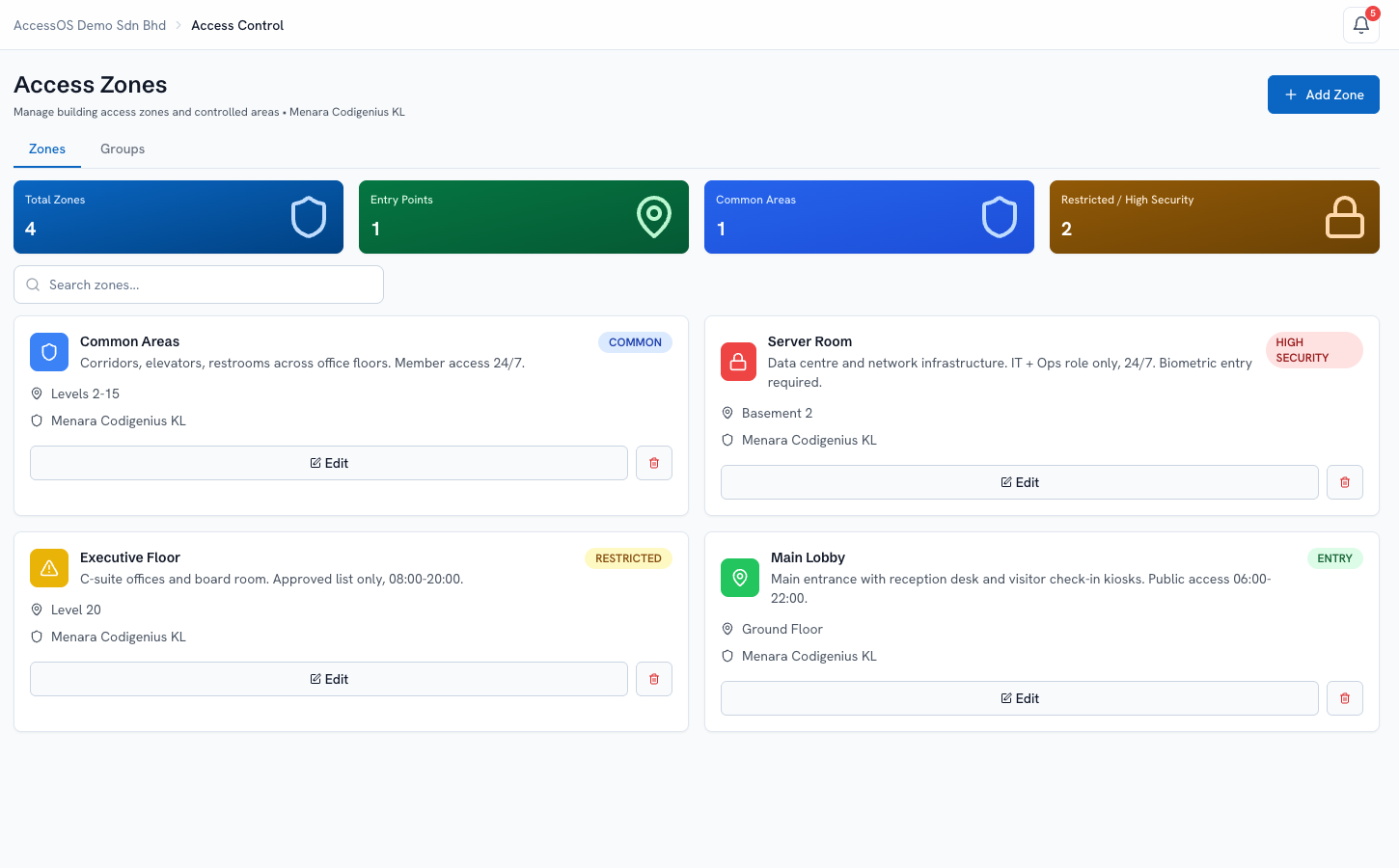
Define zones, access groups, and role-based grants. Enforced at the lobby kiosk on arrival. Enterprise adds enforcement at interior doors via your ACMS.
Visitors, occupants, and contractors. Records with photos + face embeddings. Powers host lookup, unit-admin scoping, kiosk face verification, and audit reporting. Enterprise syncs records into your ACMS for automatic physical building access.
Tailored per role. Live occupancy, approval queue, recent activity, alerts. Built for tablets.
Target by role, building, or unit. Priority levels. In-app bell plus email for urgent items.
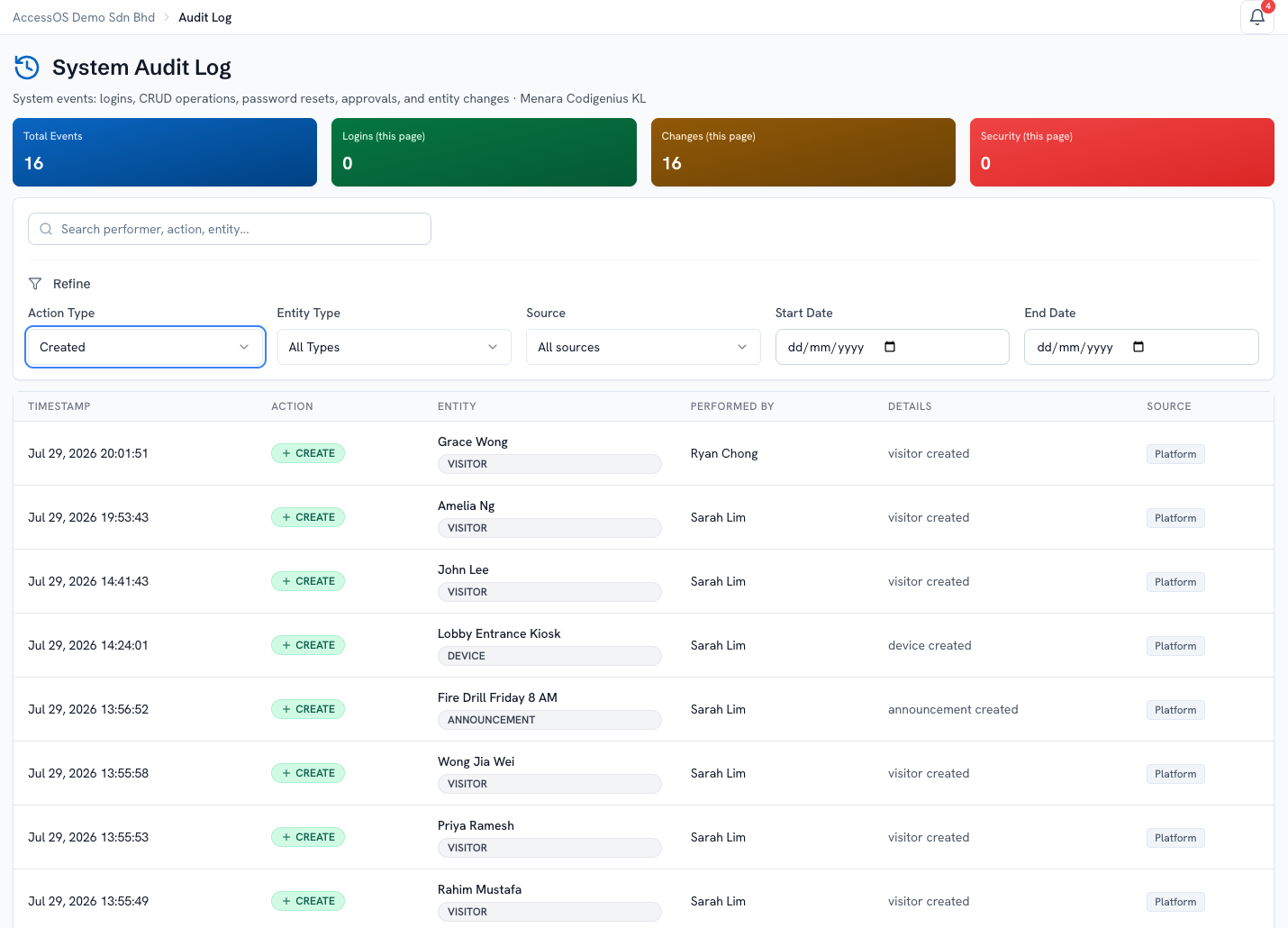
Every login, scan, approval recorded. Filter, search, export CSV for compliance reviews.
Browse and book building facilities. Booking calendar per facility. Gym, meeting rooms, common areas.
Screenshots from our live tenant. Not mockups. Demo data. Fictional personas.
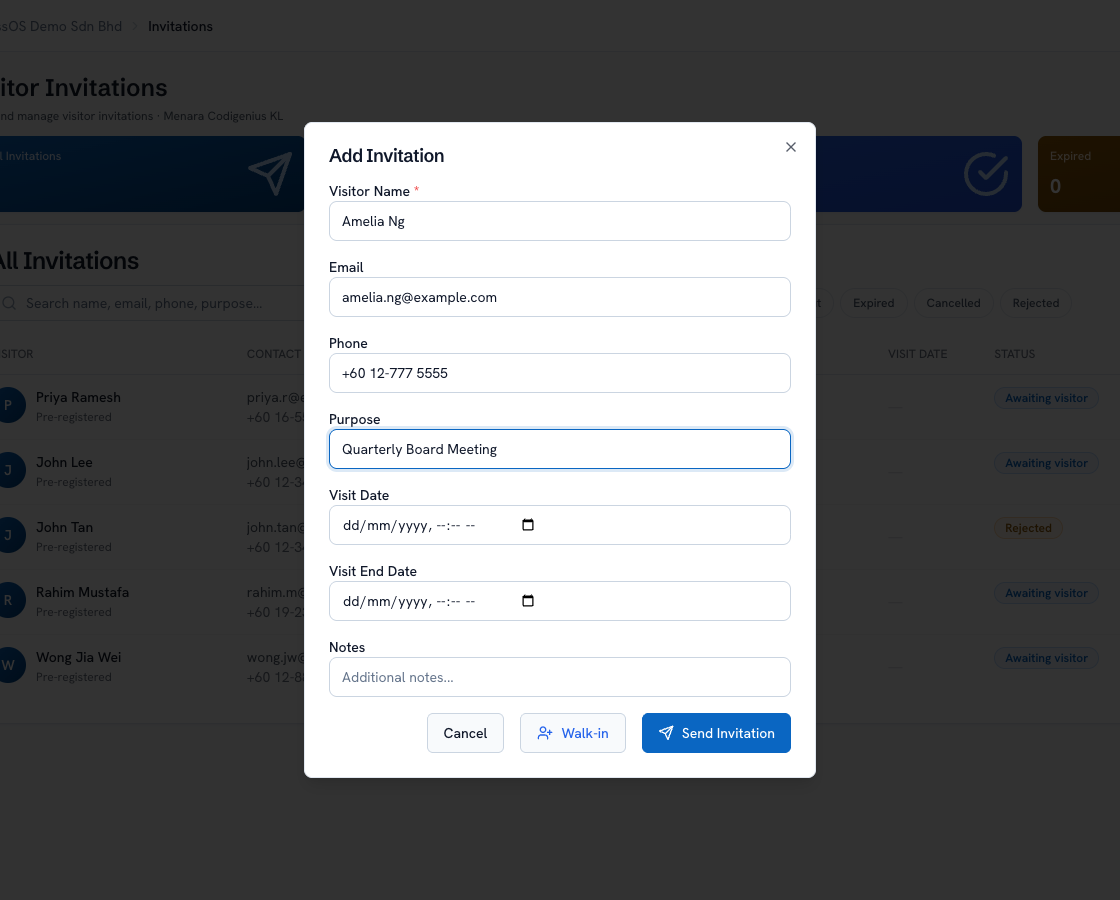
Reception or the host fills a compact form. Name, contact, purpose, visit window, host, access group. AccessOS sends the invitation link on any channel (WhatsApp, email). The guest completes their own details and gets a QR pass; security sees them on the approval queue before they arrive.
Entry, common, restricted, and high-security zones. Enforced at the lobby kiosk on visitor arrival. Enterprise extends enforcement to interior doors via your ACMS integration.
Announcements, visitor invitations, config changes, access grants. Captured with performer, timestamp, and full payload. Export any period in one click.
Explore all seven features on the demo tenant. Sign up free →
Three steps on any smartphone. No app to install.
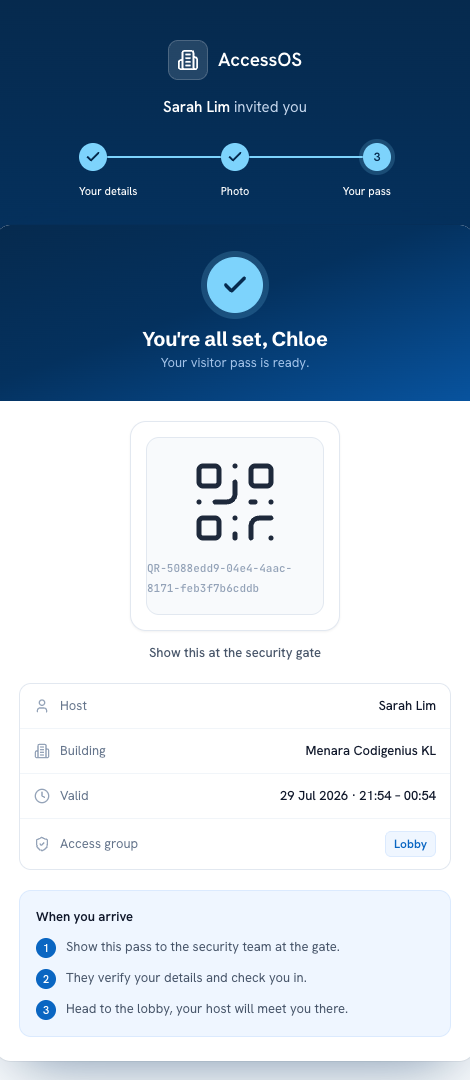
"You're all set. Show this at the security gate."
Guests receive an invitation link, add their details, take a security photo, and get a QR pass. On arrival, they scan at the kiosk and walk right in. Photos are stored securely and removed after the visit ends.
Four purpose-built dashboards, one for each role.
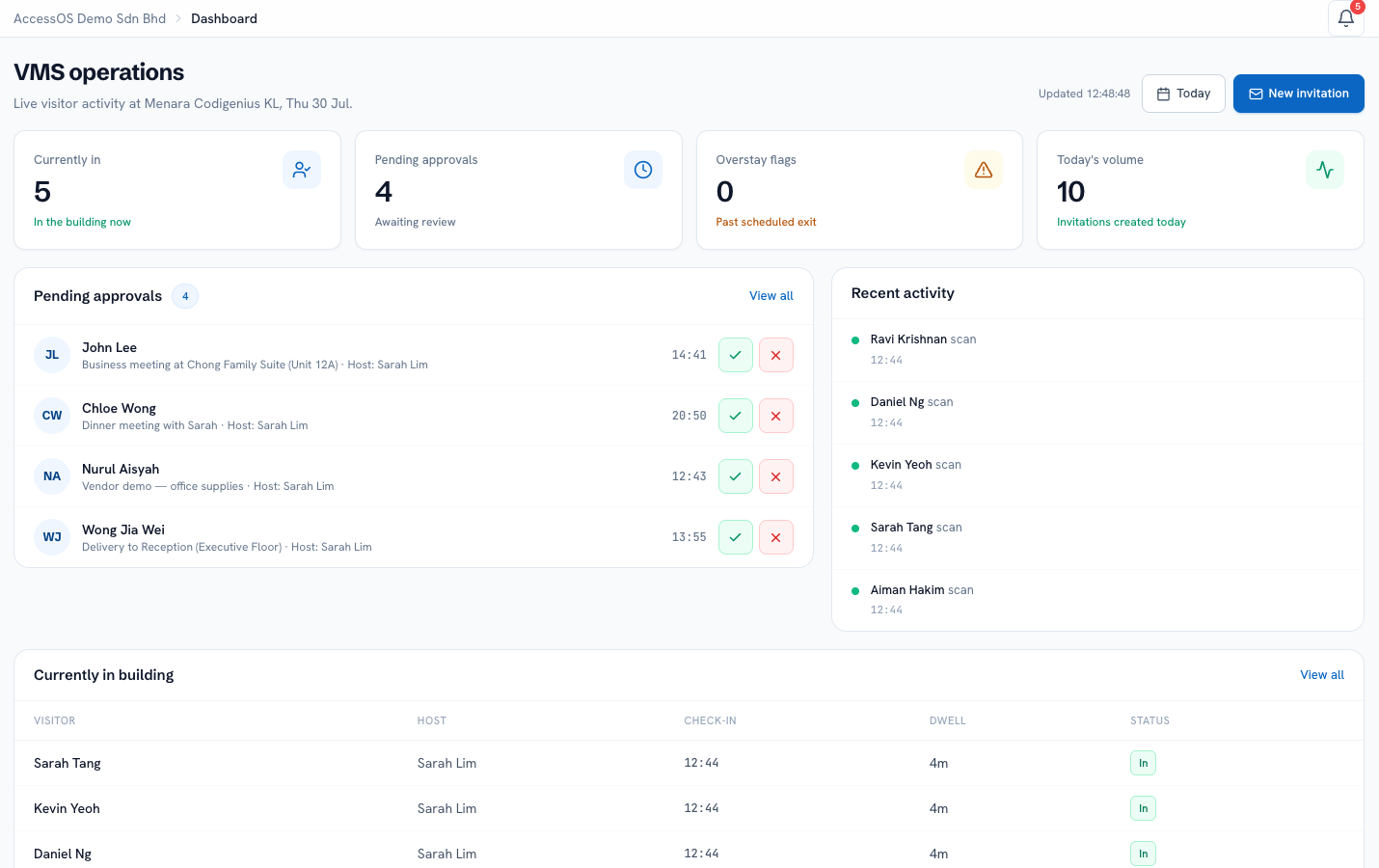
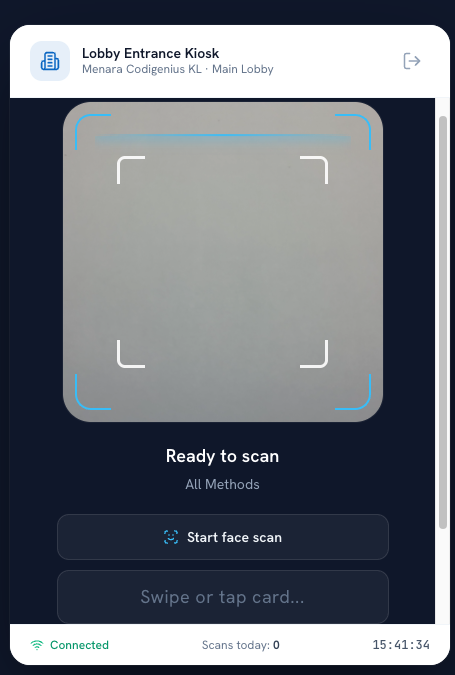
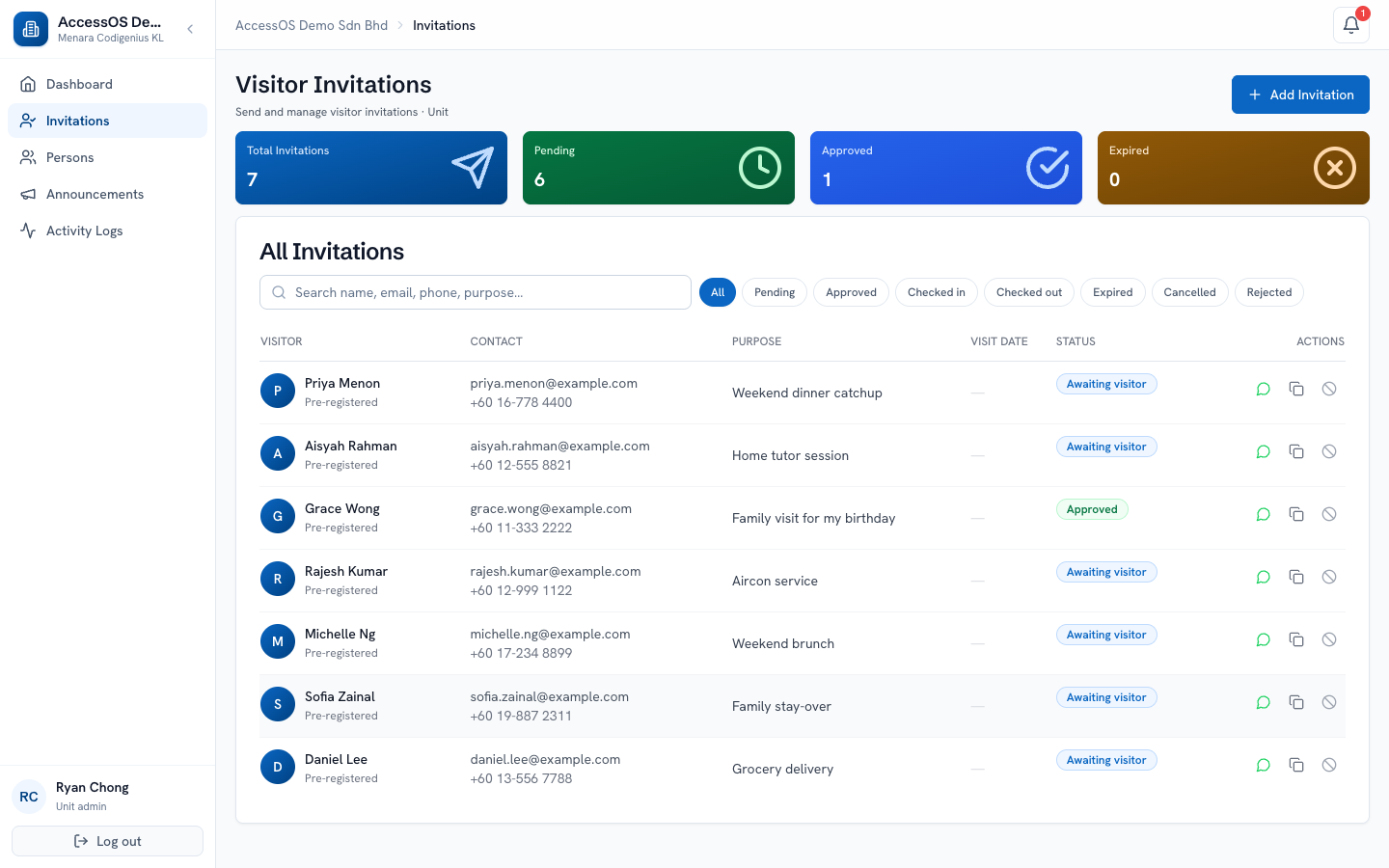
Property groups, SI partners, and corporate operators run multiple companies and buildings under one platform. Every tenant's data is fully isolated.
Visitor records, members, and audit logs scoped to one company. No tenant ever sees another tenant's data.
Each building has its own ACMS adapter, modules, access zones, and operating hours. Settings never bleed across.
A tenant company on Level 8 approves visitors for their own space. They never see what's happening at Level 15. Building management coordinates across all tenants without leaking any tenant's data to another.
| Role | Visitor | Access | People | Operations | Announce | Audit |
|---|---|---|---|---|---|---|
| Company AdminMulti-building owner | ||||||
| Building AdminProperty manager | ||||||
| Security OperatorLobby reception | ||||||
| Unit AdminUnit owner |
One audit trail across every scenario.
Planned visits · Unit Admin owns the invite.
Walk-ups · Visitor self-registers, host approves.
VIPs & groups · Auto-checked-in on operator action.
No app to download. No hardware to buy. Everything runs in the browser.
Free to try one building. Standard for production. Enterprise adds occupant sync via your ACMS + full building access.
Try AccessOS on one building
Free tier includes:
One building. Any number of tenants. One price. RM 1,000/mo covers all tenants in that building.
Everything in Free, plus:
Full building access via ACMS integration
Everything in Standard, plus:
All prices exclusive of SST. SST charged at prevailing rates where applicable.
| Feature | Free | Standard | Enterprise |
|---|---|---|---|
| Capacity | |||
| Buildings | 1 | Unlimited | Unlimited |
| Occupants | 25 | Unlimited | Unlimited |
| Invitations / month | 50 | Unlimited | Unlimited |
| Kiosk devices | 1 | Unlimited | Unlimited |
| Audit history | 30 days | Unlimited | Unlimited |
| Core features | |||
| Visitor invitations with QR passes | ✓ | ✓ | ✓ |
| Delivery via email, WhatsApp | ✓ | ✓ | ✓ |
| Lobby kiosk. Self-registration & QR check-in | ✓ | ✓ | ✓ |
| Walk-in visitor registration | ✓ | ✓ | ✓ |
| Security operator approval queue | ✓ | ✓ | ✓ |
| Kiosk scan modes | QR + Face + Card | QR + Face + Card | QR + Face + Card |
| Multi-tenant scoping (per-tenant, per-unit) | ✓ | ✓ | ✓ |
| 4 roles (Company, Building, Unit, Operator) | ✓ | ✓ | ✓ |
| Append-only audit trail | ✓ | ✓ | ✓ |
| CSV export | ✓ | ✓ | ✓ |
| Multi-building | |||
| Portfolio dashboard | — | ✓ | ✓ |
| Cross-building audit & activity reports | — | ✓ | ✓ |
| Central role & policy management | — | ✓ | ✓ |
| Enterprise integration | |||
| ACMS integration (any vendor API) | — | — | ✓ |
| Full white-label | — | — | ✓ |
| API access | — | — | ✓ |
| On-prem option | — | — | ✓ |
| Compliance | |||
| KL data center hosting (MY sovereignty) | ✓ | ✓ | ✓ |
| Face template deletion on checkout / cancel | ✓ | ✓ | ✓ |
| Support & branding | |||
| Support | Community | Priority email | Priority + named contact |
| Kiosk branding | Powered by AccessOS | No AccessOS branding | Custom / white-label |
| Onboarding | — | Included (single-building); multi-building scoped | Scoped per engagement |
Every feature below ships enabled on day one.
Every client fully separated. No tenant ever sees another tenant's visitors, members, or audit trail. Enforced at every layer: DB, API, UI.
Every login, scan, approval, configuration change captured with who, when, and from where. Append-only log. CSV export for compliance reviews.
Full data export at any time, data deletion on cancellation, append-only audit trail. Aligned with Malaysian PDPA. Hosted in a Kuala Lumpur data center.
Rejected, expired, or cancelled passes cannot be reused even with the original QR. System refuses reuse automatically.
AccessOS sits as the software layer on top of hardware you already deploy. New integrations happen through a joint engagement. Scoped and commercially agreed upfront.
Surface the ACMS, the use case, the client.
Define adapter behaviour and effort.
Agree commercial terms & SOW jointly.
Codigenius builds, partner validates.
Joint go-to-market with the new integration.
SaaS-only (browser + existing tablets): same-day signup, guided onboarding within 1–2 weeks. Data import, user training, kiosk setup on your existing tablets. Designed for same-week go-live on straightforward deployments. Single-building onboarding is included; multi-building rollouts scoped per engagement.
With ACMS integration (Enterprise): add 4–8 weeks depending on scope. Adapter development, API integration testing, and parallel-run testing are scoped and priced upfront in the deployment engagement.
Free, try AccessOS on one building. Capped at 25 occupants, 50 invitations/month, 1 kiosk device, 30-day audit history, community support. Best for evaluations, small offices, and freelancer studios.
Standard is pure visitor management in production. Invitations, QR passes, lobby kiosk self-registration, security approval queue, portfolio dashboard, cross-building reports, audit trail. Priced per building, whether you run one building or fifty. Priority email support.
Enterprise adds occupant sync via your ACMS (any vendor with an API), white-label, API access, and on-prem deployment. When AccessOS syncs to your Access Control Management System, occupant and visitor records flow into your existing hardware so access is granted automatically at doors.
You can upgrade tiers when your scope grows; data and configuration migrate automatically.
Standard is pure visitor management. AccessOS handles the full visitor lifecycle:
Occupants (staff, residents, tenants) continue to use your existing access system at Standard. Physical cards, ACMS-issued credentials, whatever your building runs today. AccessOS doesn't touch how occupants enter the building.
Upgrade to Enterprise to add ACMS integration. AccessOS then syncs occupant + visitor records into your Access Control Management System via API. Once synced, occupants use their existing cards at doors, and visitors receive temporary access on their QR pass. Your existing hardware handles the physical access; AccessOS handles the person layer.
Yes. Migration from an existing VMS or access control system is supported as part of onboarding. We map your current data schema to AccessOS entities (visitors, occupants, contractors, access zones, permissions), then run a parallel period so both systems produce the same output before cutover. Data mapping and parallel-run support are scoped and priced per engagement.
Yes. At the Enterprise tier. AccessOS syncs occupant and visitor records to your existing ACMS via its API. You keep your current access control hardware and vendor; we push person records into your ACMS so it knows who to grant access to. No vendor lock-in. As long as your ACMS exposes an API to create person records, we can integrate.
We don't touch door hardware directly. That stays with your existing access control platform. Standard is browser-first (any tablet with a browser becomes a kiosk, no ACMS or hardware integration needed). ACMS integration scope is defined and priced per engagement.
No. AccessOS runs in the browser. Operators use existing tablets or PCs at reception. Kiosks can be tablets you already have. Face-scan mode uses the built-in camera; access-card mode uses any standard NFC/RFID reader. No proprietary hardware. New hardware is only needed if you're replacing legacy door controllers or ACMS integration hardware (optional, priced per engagement).
Yes. On-prem deployment is available at the Enterprise tier. Your data, your servers, your infrastructure. We provide Docker Compose manifests and deployment support. Ongoing updates delivered through your preferred change-management process.
Yes. AccessOS is built for Malaysian PDPA compliance. What we support today:
Biometric data handling (face recognition): when face-scan is enabled as a kiosk mode, visitor photos and face templates are stored alongside their invitation record on MY soil. Face templates are deleted when the visitor checks out or when the invitation is cancelled or rejected. Buildings can disable face-scan globally; QR-code and access-card modes carry no biometric data.
Hosting: your tenant data. Including face templates when face-scan is enabled. Is hosted in a Kuala Lumpur data center on Malaysia soil, under MY jurisdiction. For customers requiring on-premises hosting on their own infrastructure, our Enterprise on-prem option delivers full data residency and change-management control.
You own your data. On cancellation, you get a full export of all tenant data (visitors, occupants, access history, audit log) in a machine-readable format (CSV plus JSON). Standard: export delivered within 5 business days of your cancellation request. Enterprise: export terms in your service agreement. After the export is delivered and confirmed, your data is deleted from our systems in line with the retention policy in your service agreement.
Monthly billing with 30-day notice cancellation on all tiers. No lock-in. Enterprise deployments may include custom terms negotiated per engagement (e.g., multi-year commitments in exchange for further discount or bespoke on-prem provisioning).
Free uses community support (forum + docs, best-effort). Standard adds priority email during business hours (Malaysia time). Enterprise adds priority queue plus a named point of contact for platform and integration. Every tier includes all software updates, security patches, and access to release notes.
Book a 15-minute demo. We'll show you how AccessOS fits your properties. Modules switch on or off per client, no rebuild required.
Book a demo